Help Desk Integration - WhatsApp
Manage WhatsApp conversations from Enchant shared inbox

%20--%3e%3c!DOCTYPE%20svg%20PUBLIC%20'-//W3C//DTD%20SVG%201.1//EN'%20'http://www.w3.org/Graphics/SVG/1.1/DTD/svg11.dtd'%3e%3csvg%20version='1.1'%20id='Layer_1'%20xmlns='http://www.w3.org/2000/svg'%20xmlns:xlink='http://www.w3.org/1999/xlink'%20x='0px'%20y='0px'%20width='760px'%20height='760px'%20viewBox='577.246%20151.438%20760%20760'%20enable-background='new%20577.246%20151.438%20760%20760'%20xml:space='preserve'%3e%3cpath%20fill='none'%20d='M957.392,155.197c-207.525,0-376.295,168.707-376.369,376.073c-0.102,70.811,19.84,140.201,57.516,200.156%20l8.951,14.223l-38.014,138.783l142.396-37.336l13.75,8.146c57.748,34.271,123.963,52.402,191.486,52.438h0.143%20c207.365,0,376.135-168.725,376.215-376.104c0.316-99.838-39.328-195.652-110.092-266.081%20C1153.003,194.681,1057.226,154.962,957.392,155.197L957.392,155.197z'/%3e%3clinearGradient%20id='SVGID_1_'%20gradientUnits='userSpaceOnUse'%20x1='-584.5615'%20y1='-180.812'%20x2='-583.9415'%20y2='-76.2869'%20gradientTransform='matrix(6.152%200%200%206.152%204551.5044%201312.7036)'%3e%3cstop%20offset='0'%20style='stop-color:%2357D163'/%3e%3cstop%20offset='1'%20style='stop-color:%2323B33A'/%3e%3c/linearGradient%3e%3cpath%20fill='url(%23SVGID_1_)'%20d='M957.392,155.197c-207.525,0-376.295,168.707-376.369,376.073%20c-0.102,70.811,19.84,140.201,57.516,200.156l8.951,14.229l-38.014,138.777l142.396-37.338l13.75,8.146%20c57.748,34.271,123.963,52.396,191.486,52.434h0.143c207.365,0,376.135-168.725,376.215-376.104%20c0.316-99.838-39.328-195.652-110.092-266.082C1153.003,194.677,1057.224,154.961,957.392,155.197L957.392,155.197z'/%3e%3cpath%20fill='%23FFFFFF'%20d='M844.121,342.071c-8.479-18.832-17.398-19.213-25.451-19.539l-21.68-0.266%20c-7.543,0-19.799,2.83-30.156,14.149c-10.361,11.32-39.59,38.678-39.59,94.323c0,55.645,40.529,109.414,46.178,116.969%20c5.646,7.555,78.242,125.385,193.205,170.719c95.533,37.676,114.975,30.184,135.719,28.299%20c20.744-1.883,66.916-27.357,76.334-53.768c9.42-26.412,9.426-49.039,6.604-53.77c-2.824-4.73-10.367-7.543-21.688-13.201%20c-11.32-5.66-66.916-33.02-77.281-36.797s-17.902-5.652-25.451,5.666c-7.549,11.32-29.197,36.783-35.799,44.332%20s-13.189,8.494-24.51,2.842s-47.74-17.602-90.951-56.131c-33.621-29.979-56.314-67.002-62.924-78.314%20c-6.607-11.313-0.701-17.441,4.971-23.076c5.076-5.068,11.309-13.209,16.975-19.811s7.531-11.318,11.295-18.855%20c3.766-7.537,1.889-14.156-0.941-19.809c-2.828-5.654-24.805-61.588-34.855-83.958'/%3e%3c/svg%3e)
'%3e%3cpath%20d='M14,7H9V2A1,1,0,0,0,7,2V7H2A1,1,0,0,0,2,9H7v5a1,1,0,0,0,2,0V9h5a1,1,0,0,0,0-2Z'%20vector-effect='non-scaling-stroke'%20fill='%23637887'%20/%3e%3c/g%3e%3c/svg%3e)

WhatsApp is becoming increasingly popular for customer support due to its wide user base. With more than 2 billion users in over 180 countries, businesses can reach a much larger audience than ever before.
Customers also expect to connect with businesses as easily as they do with their friends and family. This has made WhatsApp an attractive option for companies looking to provide better customer support.
Manage WhatsApp Conversations at Scale
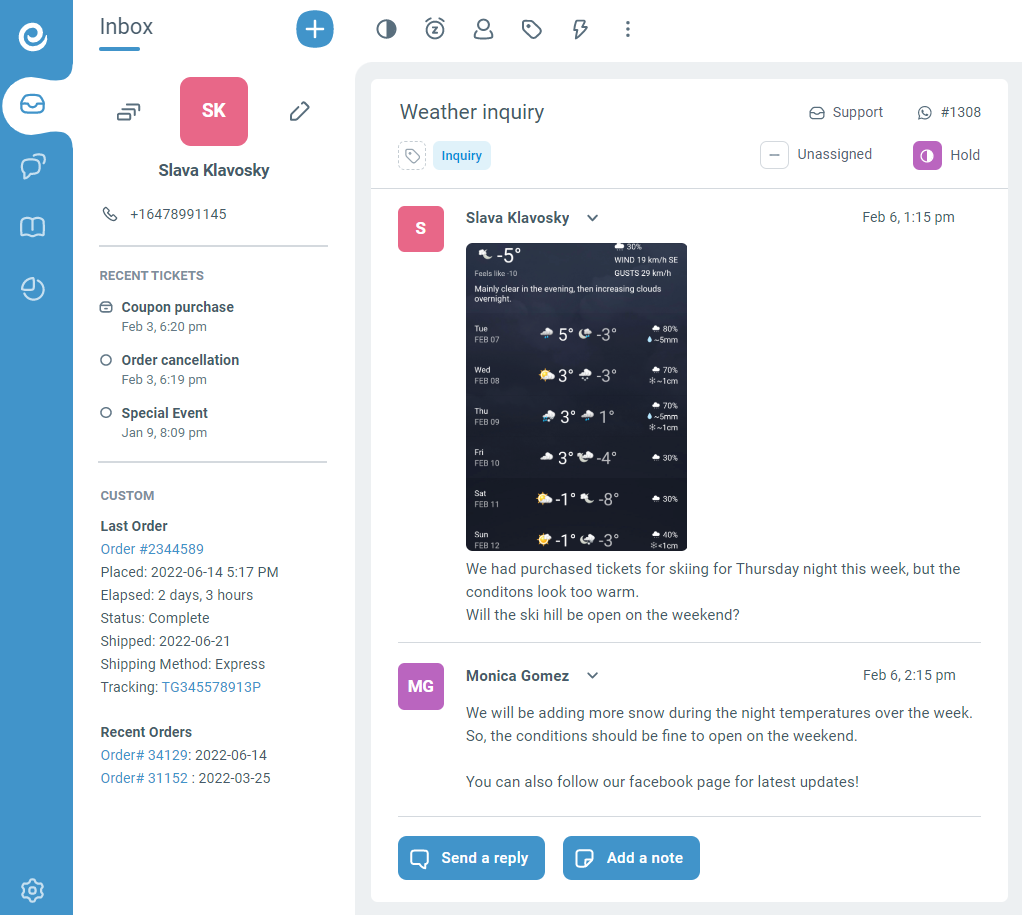
Using WhatsApp integration, Enchant converts the customer requests received via WhatsApp into tickets in your Enchant inbox.
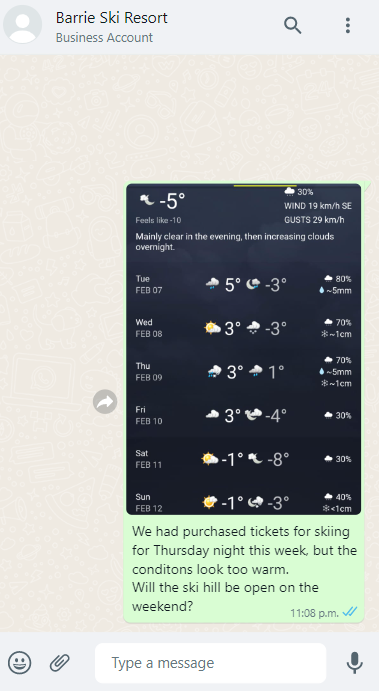
When your team writes a response on a WhatsApp conversation, it is sent to the customer through your WhatsApp channel.
Now, your support team can use their standard workflows and productivity tools to work together and efficiently resolve your customers’ problems.
Benefits of using WhatsApp Integration
By adding WhatsApp integration with Enchant, your team is able to serve your customers more effectively from a central place:
- Boost Productivity: Assign tickets for clear ownership of requests, use macros & bulk actions for speed, and work faster with canned responses.
- Team Collaboration: Share drafts, exchange private notes and avoid duplicate responses with collision detection.
- Workflow Automation: Apply custom rules and organize request types for initial routing.
- Customer Context Customer information from your CRM and recent tickets are visible when writing a response to the customer.
- Communication History: All customer interactions via the WhatsApp channel are archived in the customer's communication history within Enchant.
- Analyze Trends: Built-in reports with ability to drill deeper for details over a certain length of time.
You customers will be able to see your responses in their WhatsApp, and continue the conversation when they are available.
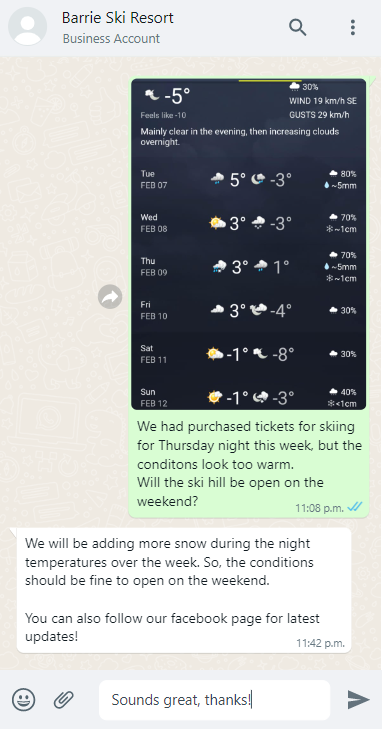
Providing help to your customers using the channel that is most comfortable for them will lead to happier customers!
Integrate WhatsApp with a Few Clicks
Connect your WhatsApp with Enchant by adding the WhatsApp channel from the Channels settings page. It's a hassle free no-code solution that does not require use of advanced technical skills.
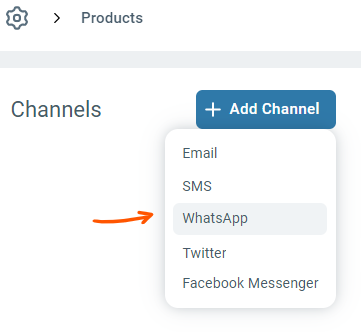
When you add the channel, the system will guide you through a few simple steps to give Enchant access to your WhatsApp. Read here for more details on the setup.
If you have any questions, feel free to reach out to us.
Common Questions

So a WhatsApp number managed by Enchant cannot be accessed from WhatsApp mobile apps or WhatsApp web.
Deliver Omni-Channel Customer Service
Start free today. No credit card required.


